Wednesday, April 17, 2019

Review of the Mindshift Gear Backlight 26L backpack

I wanted a smaller backpack that is big enough to hold my 100-400 mounted, but not be too large for urban use.  I've tried slings and beltpacks, but I always want to hold a few extras like water bottles and snacks.  My F-stop Loka can do the job, but feels a bit big in an urban setting (I get quite a few stares if I use the Loka at the zoo).  I considered the F-stop Lotus, but found the large shallow ICU, the ideal size for this job, had been discontinued.  I stumbled onto reviews of the Mindshift Gear Backlight 26L, and decided to try it.


The features that attracted me to the bag:  
  • It's a bit smaller than my Loka.  
  • It looks like a fairly ordinary pack, albeit stiff from padding.  
  • It has back panel access.  
  • The camera compartment is more than long enough for the 100-400 mounted.  In fact, I can store it with my hood in the ready position and still have the 1.4x mounted as well. 
  • It can hold two water bottles, one on either side.

Other features:
  • Tripod carry system on the front of the pack
  • Can use the side compression straps to carry a tripod on the side
  • Rain cover included
  • Front pocket is big enough for a thin layer and snacks
  • Lightly padded laptop sleeve

The Backlight 26L comes in green and black.  I choose green.


Fit and Quality
It is nicely made, with thick padding that is both soft and firm enough.  The belt wings are stiff enough to let the weight sit on my hips.  I find the pack comfortable enough if I don't overload it; If I completely fill the camera section with lenses, it feels heavy.   It does not have an internal frame, but is stiff enough that I don't think that matters for how I use it.  It holds its shape whether fully loaded or empty.


The padding on the shoulder straps and back is thick and well-cushioned, with nice mesh to let some air flow and wick moisture.  It doesn't breathe quite as well as a good hiking pack, but it isn't bad.


The zippers are high quality and easy to use.  The big zipper pulls make opening and closing while wearing gloves easy.  Access to the camera compartment is as quick as it gets and you can see everything at once when open.


Being a smaller pack, it does not fit my back perfectly, nor does it have load lifters, and so it can't replace a serious hiking backpack.  For reference, I have an 18" torso.  I believe the Backlight fits a 16" torso. 


Space
I measured the Backlight at about 18" tall, 10.5" wide, and 5.5" deep (interior dimensions). This is usually more space than I need. However, it is nice to be able to hold my 100-400 mounted with 1.4x and lens hood in the ready position (then again, to be ready you really need the camera in your hand), and still have room along the sides for extra lenses and filters.

It has a lightly padded laptop sleeve inside the front pocket, away from your body. I like this light padding because it doesn't add much thickness to the pack when it isn't used.  It also has an un-padded sleeve just outside the laptop sleeve that will fit a large tablet, and a couple of shallow organizer pockets.   Overall the front pocket is large, deep and expandable.  I can fit thin layers in it like a rain shell, but at the expense of other items. It works well as a travel bag.


The two side stretch pockets are very deep and completely swallow my 18 oz water bottles.  This actually makes it hard to pull the bottles out while the pack is on my back, but the bottles have never fallen out. 


Cons
While the camera compartment layout is great if you have a longer lens or two, that means the accessories pocket is on the front.  You have to change the bag orientation to get to it.  It is deep and shallow and you can't see everything, so you have to feel around for items.  Also, if the items you put in there are small and all fall to the bottom, you can't lay the camera completely flat when you get into the camera compartment.  It also means that soft items like a sandwich will get squished when you access the camera compartment.  This is the result of the design choice.  Everything is a trade-off in design.

The organizer pockets are too shallow for a mini-maglight, which I always carry.

The camera compartment opening has a loop inside which is meant to go around your neck and hold the camera compartment open when the backpack is on your waist, slung in front of you to change lenses.  Neat idea.  I expected it would have a hook to stow it when not needed.  No such luck.  It just floats around loose and gets in the way.  Every time I zipped the bag closed, I had to push the loop out of the way.  I ended up removing the loop.

The top pocket is too thin for all but the smallest items.  I've stuffed small tools like my hex and star wrenches, and AAA batteries in it.  Not much else will fit.   If I were to design a mark II version, I would move/remove the tripod carrier and make this pocket more like a "brain" used on hiking packs, with a rear opening and more space.  I asked Mindshift for this feature in the next iteration.

It is a good thing that I rarely use my backpack to carry my tripod.  The built in tripod carry system puts the tripod on the front of the pack, away from your body, making the bag hard to set down when you need to access your camera gear.  I prefer side carry... but honestly I usually just carry my tripod in my hands.  

$250 is pricey for a pack this size.


Summary
If you need a backpack this size with the features it has, it is a great pack.  

I've started using it on my commutes since I sometimes need to carry my laptop to and from work, and I like photographing flowers and sunrises on my way in.  With the stiff hipbelt, it carries the laptop and camera much better than my old student pack (shoulder straps only).

I use it for travel, short walks around small lakes, and urban trips such as zoo visits.

I am still searching for a great hiking pack that can carry my camera gear comfortably and has easy access.  Finding the balance between all the things I need has proven difficult.

Since buying this pack, Mindshift has released two other sizes of this pack, an 18L and 36L.  For simple zoo outings, the 18L would work just fine, though I'm not sure about the fit and comfort vs my 26L.  The 36L is meant for pro DSLRs and I don't need that much depth.

Update:  Mindshift and Thinktank have remerged (Thinktank is the parent company), and came out with a 45L Backlight.  I like the feature set but have to try it on for size. 


Saturday, March 30, 2019

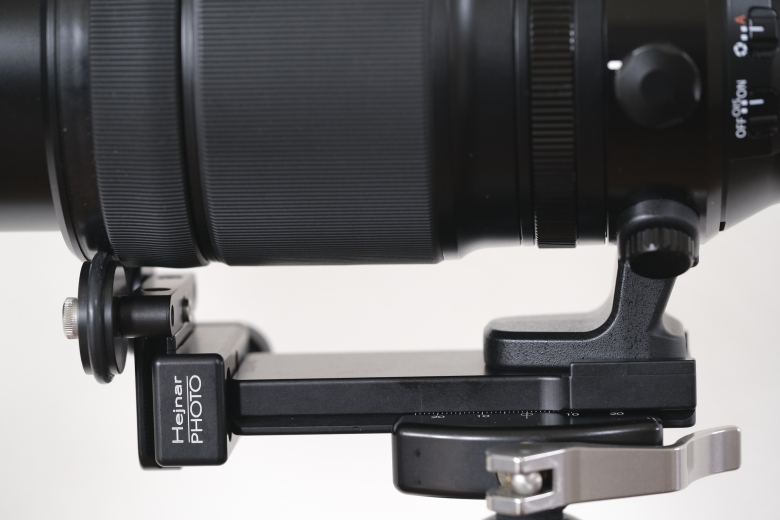
Hejnar lens support


I noticed my new tele zoom had a little wobble at the lens collar.  Enough so that I thought longer exposures in wind would probably suffer loss of sharpness.  I thought about several designs I could make myself, given some aluminum and equipment.  I thought back to when I read one of John Shaw's photography books in which he described making a brace for his Nikkor 300mm, and other articles where people braced their telephotos, sometimes with 2 tripods.  Dual tripods work only if you are focused solely on a single spot, such as a bird's nest.  If you need to move around, forget it.  So the single brace obviously has more general appeal.

As I gave each of my ideas more thought, I remembered Hejnar photo store having some interesting contraptions, so I headed over there and found not only several parts I could use, but a telephoto support specific to my lens.  After a little thought, mulling over my options, and a conversation with Mr. Hejnar, I bought one.

It arrived quickly, much faster than I expected... just a couple of days.

Inside were a few parts:  The main foot (a 4" long Arca-Swiss style base), a small clamp to fit on the end, tools, an anti-rotation pin, and a roller/support. Everything is precision-made and obviously of high quality with attention to detail.

The parts (it included more hex wrenches)
Putting it together was like playing with legos.

The entire Hejnar support system

Anti-Twist flange and safety stop

In use

Another angle


The bottom line is, it works, and works better than I expected.  It eliminated the wobble at the lens collar.

The magic comes from tightening the roller in the clamp up against the lens; this puts pressure on the front of the lens, a second point of contact that eliminates the wobble.  The fact that it has rubber lined wheels means you can focus manually and rotate to vertical on a tripod without any trouble, without scratching the lens barrel.


Clamp holding the support tightly against the lens


Support removed

Beyond serving its main purpose as a brace, it is long enough that it makes a great handle for carrying the lens; much nicer than a standard Arca-Swiss plate.

The length means you can balance your camera and lens more easily on your tripod.

Two potential downsides exist, only one of which I noticed in real use:

  1. It adds some bulk, and takes up a little more space in the bag (not a problem for me).
  2. To reverse the lens hood, I have to remove the roller.  If you can store the lens hood in shooting position at all times, this isn't a problem.

Hood in reversed position requires removing the support/roller.


It works, it is well-made, and I am a happy customer.  I won't hesitate to buy any other parts I need from Hejnar.  His body and lens plates are less expensive than some other brands too.

If you need something like this, but he hasn't made a specific brace kit for your lens, he has many parts you can put together yourself.  And Mr. Hejnar is friendly, helpful, and quick to respond to questions... so if you have doubts, just ask him for help.

A custom variation I considered was this:  keep my standard lens plate on the lens collar, add a clamp to a Hejnar bar to connect to the plate, then add a small 1" clamp to the other end of the bar and use a taller support/roller.  This would have meant the lens itself would store more compactly, but I'd have to remove the support every time I put it away, and have to dedicate another spot in the bag for the support.

Sunday, February 10, 2019

Diffraction: Friends don't let friends use f/22

Diffraction.  You likely learned (or will learn) about it in freshmen physics.

As a physics student, I think diffraction is fascinating.

As a photographer, I think diffraction sucks. We can't stop it, but we can minimize the badness.

Diffraction softens the details in an image and has a noticeable impact on the image quality of your photos.   I remember reading about diffraction in an old copy of Modern Photography magazine (1980s I think).

In a nutshell, the smaller the aperture, the more diffraction will impact your image.

There is a point in stopping down where your images stop getting sharper and start losing detail.  That's diffraction taking over.  To avoid diffraction, just avoid stopping down that far.

How far?  How low can you go?  Instead of doing a calculation, do a simple test.  An open camera test.

Grab your tripod and your favorite lens.  Find a detailed subject.  The closer your can get - the higher the magnification you use for the test - the easier it will be to see diffraction. My macro lens is my favorite, so I'm all good here.  Really though, just shoot whatever you want because it will tell you what you can tolerate in your normal use case.

Focus carefully.  Keep the camera rock-solid on your tripod. Use your best ISO setting. Use a remote release.  Use mirror lockup if you have an SLR (live view!).  Use electronic shutter if you have a mirrorless body.  Or use a flash to keep the speeds up and avoid vibration.  In other words, use good technique to make sure you aren't seeing other problems like vibration or bad focus.  Aperture priority is easiest.

Start with your aperture wide open, and make an image at every stop until you hit the smallest aperture on the lens.  

Evaluate the results.  Here is what you should expect from most lenses:  The details will sharpen as you stop down, you'll see an "optimal" aperture for the lens, and then the details will soften beyond that.  In APS-C and "full frame" cameras, what I see is optimal sharpness usually at f/5.6 or f/8, still good but a little softer at f/11, more softening at f/16, and downright soft at f/22 and smaller.  I usually don't go past f/11.  When I want to slow down the shutter even more, I use ND (neutral density) filters.

Note that no matter what camera I have used, the apertures above have always been the answer I've found.  I'm happy up to f/8, I'm okay with f/11, and I avoid smaller apertures most of the time.  That has been true within the limits of the cameras I've used... regardless of sensor size (APS-C or 'Full-frame'), film vs digital, or pixel density.  Some people perform calculations for DLA (Diffraction Limited Aperture) but using your eyes is the only way to tell what you can tolerate.  

Check out the progression from f/8 to f/22 on this coin (all at 100% magnification):

f/8:

f/11:

f/16:

f/22:


So naturally, I didn't know if I should laugh or cry when I saw someone comparing two brands, had one stopped down to f/22 (and the other not!) and complained about the f/22 image being soft.  His conclusion was that the lens wasn't sharp. Sigh.  The reality: we have no idea how sharp that lens was because at f/22 there was zero chance of a sharp image.

Friends don't let friends use f/22!

For more details, read this:  https://en.wikipedia.org/wiki/Diffraction

Sunday, December 2, 2018

Canon's 100-400 zooms

When I bought into Canon, the EOS system had existed for many years.  I used a bonus and started with a 20D (which struck me as already better than 35mm film) and the 70-200 f/2.8L IS.  I later added a used 300mm f/4L and a 1.4x teleconverter.   At the time, I lived near Huntley Meadows, a wetlands near Alexandria, VA, which has some amazing wildlife (if you find yourself in the area, I highly recommend you go).  But I found that no matter which lens I had at the ready, it was the wrong one.  If I had the 70-200 mounted, of course I wanted more reach.  If I had the 300+1.4x, I'd inevitably turn a corner and find I was too close.  Both of those lenses were great, but I realized I really wanted the 100-400 for my use.

I had a brief overlap, and found my copy of the 100-400 was easily on par with the 70-200L and the 300L + 1.4x at respective lengths, and so I gave up the speed for the range I really needed.  It was just about perfect for my needs.  My biggest gripe was the minimum focus distance of about 1.8m.  I can't tell you how many times I tried to get close to a frog only to have to take a step back.  The other gripe was iffy bokeh.  It was fine in most cases but could sometimes show a nervousness that I don't like.

Originally, I avoided the first 100-400L because of several reports that it was soft.  After some time however, I read of more and more reports where it was quite sharp; on par with the rest of the L lenses.  Mine was quite sharp.  I found the resolution at 100mm on par with my 100 USM macro, albeit with lower contrast (making it seem less sharp).

Some people complained about the push-pull zoom design, but coming from older Minolta manual zooms, I was used to that design.

I never saw it collect dust inside (some people call it the dust pump).

I never tested corner sharpness because I found that 99% of the time, the corners were out of focus anyway and just didn't matter.

Here are some images from the original Canon 100-400L:

The original model was very sharp, focused reasonably quickly, had useful IS, etc

Nice detail and contrast from the original Canon 100-400


So when the 100-400 II finally arrived, I wasn't very interested... until I learned about the much closer minimum focus distance (1m!).  I knew it would be useful for me.  As I researched the lens, I learned it was much sharper with better contrast, has better AF speed, works well with the latest teleconverters, has better stabilization, better bokeh... in short the new model is better in most ways.  Most of those improvements didn't matter to me, honestly, but again the short 1 meter MFD is wonderful.

So I saved my pennies and sold the original and finally bought the mark II.  It's worth it, but it isn't perfect.  I've seen some purple fringing even in the center with certain high contrast images. I wish the lens collar was removable, and, as I was happy with the push-pull zoom, I wish they'd kept that design.  Those are just nitpicks.  I'm super happy with the results, and I adapted to the new zoom ring.

The improved stabilization is great.  One of my first hand-held test shots was done at 400mm and 1/15s and it was perfectly sharp.  That was a static subject of course.  And your results will vary depending on your caffeine level.

My only big gripe with the 100-400 II is the swirly bokeh that can happen in some images.  It doesn't bother everyone but it definitely distracts me from the subject when I see it.

Here are some samples from the Canon 100-400L mark II:

Canon 100-400 II, showing a bit of swirly bokeh
Wonderful detail and contrast from the 100-400 II
It makes a great landscape lens too


I considered some other options such as the 400L, a Tamron 150-600, the Sigma 150-600, etc, but nothing has the MFD or portability of the 100-400 II.

If you shoot Canon and need a portable and versatile longer lens, then one of these will easily fit your needs, and fit in your bag.  If you can't afford the mark II, the original is very viable.


Sunday, October 28, 2018

Old school controls - The Fuji X-T3

My photography journey began in earnest when my parents bought me a used Minolta SRT-101 body and 58mm lens (the standard lens at the time).  I used it through high school, college and beyond.  I am used to mechanical controls, manual focus, aperture rings, and physical shutter speed dials.  By the time digital came of age and my film cameras had become tired (requiring annual repairs), old school dials were no longer a thing.  So I based my first DSLR purchase more on how the camera felt in my hands, sighed a deep sigh, and gave up the old school ways.  I got used to the modern dials and buttons, but always missed the aperture rings.

Then I saw the Fuji digital cameras with old school controls.  Real shutter dials and aperture rings.  And remarkably good lens quality.  At first, the lenses were too few and didn't satisfy my needs, seeming to be more for street photography and portraiture (I mostly focus on nature, wildlife, landscapes).  But I kept tabs on the system and watched it grow and mature.

The first time I saw a Fuji camera in the wild was during a snowfall at Great Falls, Virginia.  It was a cold, windy, snowy morning and I drove to Great Falls, having an adventure just in the drive.  I walked in the snow to the viewing area, setup my DSLR, and started shooting.  Then a guy came up next to me with a tiny camera.  I blinked.  I looked at my huge setup.  I looked back at his gear, and noticed the Fuji logo.  I wondered to myself... why am I carrying all this?  But I continued to do so for some years.  Not without pain, or making a choice of which lenses to carry on a hike.

By the time the Fuji X-T1 came around, I was pretty excited.  I felt certain that it wouldn't be long before the Fuji would match all the nice tech I had in my DSLR and the lens selection would meet my needs.  And the next generation did indeed do that, as I expected.  It was plenty good enough to replace my high end DSLR.  But I still hesitated.  My DSLR lenses are superb.  I get great results from the system, and the cost of switching systems isn't cheap.

Then two things happened.  One, I was officially diagnosed with a bad back, explaining why I have had so much trouble getting a good fit with backpacks.   And Two, the X-T3 was announced.

I read the specs and, honestly, had to re-read them.  The X-T3 specs blew away my DSLR.  We all know reality never lives up to the hype, but still... there were many useful improvements that caught my attention.  I already knew the older Fuji generation would satisfy my needs, but the X-T3 took it to a new level.  So I read reviews, watched the videos, and weighed the options.  And pulled the trigger.  Here was a camera that matched my DSLR and then some, but was half the size and weight.


The camera arrived and I've been playing with it.  I only have a pair of lenses so far; the "kit" 18-55 (which is a remarkably good lens for the price), and the 14mm wide angle, which is simply superb.    The 14mm seems to be just as good as a friend's Zeiss ZE 21mm at a small fraction of the weight and size.  I've used each lens enough to know they work well.

Should I count the adapted Minolta lenses I kept from long ago?  I've been using an old 58mm f/1.4, and my old favorite, a Kiron-made 100mm Vivitar macro lens. I found this old macro doesn't stand up to my newer DSLR macro lens, but hey, it's fun.  The 58mm, though it has low contrast wide open, has very nice bokeh.  I have a couple of other manual lenses as well.

The nostalgia factor is high.  Using old all-mechanical lenses with an electronic viewfinder is trivial.  Focus peaking does a pretty good job.

When I put a couple of lenses in my pack to carry with me on a short outing the other day, I had to double check the pack... because it is so light I couldn't believe it had a camera inside.  Even my 9-year-old thought the pack was light.

The AF is fast.  I think it is as fast if not faster than my high end DSLR (no measurements, sorry). And it is accurate.

Using electronic shutter mode, the X-T3 can go up to 20 fps with zero blackout.  This is tremendous for tracking birds in flight, etc.  I just need to get the Fuji 100-400 to make use of it.  More on that when I have real world experience.

The eye focus seems to work quite well.  I have to get used to this feature... I'm still used to picking the AF point with a joystick.  Once I get a fast X portrait lens, this feature will be great to have.

The focusing works in much lower light than my DSLR can handle.  And it can "see" in light I can't see in.  I can see a dark room via the LCD that I can't see with my own eyes.  That's impressive.

The touchscreen is nice overall.  I customized it to use the settings I think I'll change the most often.  It is nice to AF on the spot I touch.

The tilt screen is even better.  I can finally get those weird angles without killing my neck, my back, my knees, etc.  I can get the camera to ground level, in either horizontal or vertical, and tilt the screen out to easily view it.

The viewfinder even has better eye relief than my high end DSLR.  For someone with glasses like me, who uses the viewfinder, this is very helpful.

Fuji has made so many nice little touches to the system that I'd never be able to list them all.

And the controls!  They make sense.  I know the settings just by looking at the camera.  The menus aren't bad either (I only had to hunt for how to turn on the touchscreen... turning it on is not in the same location as the settings for how the touchscreen works).  A shutter dial,  Aperture rings!  I don't have to hunt for which button to press to adjust the basics.  ISO, shutter speed, and aperture are right in front of me (though I wish the 18-55 ring had aperture labels).  Of course, the settings show in the viewfinder and LCD as well.

And here is some crazy talk... I think the build quality of these Fuji lenses is superb.  The rings turn as nicely as my older manual lenses.  The zoom is as smooth as anything I've used.  The manual focus feel is nearly as good as the best Zeiss lenses I've held.  I have less play in the mounts than I do in my Canon L glass.

All of the Fuji X lenses are focus-by-wire. I didn't think I'd like that, but I found a setting to put the lenses in "linear" focus mode.  In linear mode, the lenses don't vary how much focus by how fast I twist the ring; it stays constant by the amount of turn... and feels the same as my old manual lenses.  In general, I use AF with AF lenses, but I thought this was a very nice feature. It let me be precise and it felt natural.  You can also switch the direction of focus in manual focus mode, if you don't like the default.

For the record, I looked seriously at many other options of all brands.  After all my research, I think Fuji is the only serious APS-C system available now.  The lenses are generally small and of great quality, the sensor is strong, the features are great... and it fits my hands, my budget (after I sell my DSLR gear), and my weight requirement.

I have a couple of gripes so far:
  • One is that, while the main dials are great, I sometimes touch buttons or the screen in ways I didn't expect, and a setting changes unexpectedly. I expect this problem will go away as I learn the touchscreen controls.
  •  Another is the lens caps; the center pinch is difficult to get on and off under normal conditions, and 100% impossible to use with gloves on. Obviously it is easy to replace lens caps.
  • Then the remote release just feels super cheap.  It has a thin cord and flimsy plastic case.  I may take advantage of the old school physical plunger-type release. 
  • The microprism manual focusing mode hasn't worked well for me with my old lenses.
  • Lack of IBIS.


We'll see how it all goes and how I feel after the honeymoon is over, and perhaps the nostalgia wears off.


Saturday, June 9, 2018

Review of the FLM CB-48F II ball head

I've been using ball heads for at least 30 years.  I don't switch between them very often, at least not when I have a good one.  Most have been very strong and solid, but all of them have shifted a noticeable amount while I tighten the ball.  Even a small shift becomes very significant at high magnifications (closeups).  In the past I compensated by aiming a bit further in the opposite direction of the shift, hoping it will stop right where I want it.  

For years, I've been on the lookout for something that didn't shift, but I assumed I'd have to get a geared head to achieve that level of precision.  I'm happy to say I was wrong.

I discovered the brand, FLM, when I read this dpreview article:  https://www.dpreview.com/reviews/battle-of-the-titans-top-ball-heads-tested.  I was impressed with just about everything I read about it.  The 58mm model seemed a bit large, more than I needed for my gear.  After much research (way too much), I bought one of the 48mm models... the CB-48F II.  There are two other options that I felt I didn't need: a tilt function, and a pan function (it clicks every 15 degrees).  The FLM SRB-60 clamp looks like a great design, but since I already have a pair of good clamps, I bought the model without a clamp.


Before I go further, I want to clear up some confusion.  The FLM ballheads have such fine precision that it is possible to turn the locking knob several times before it feels secure, if you don't have any tension set.  This has been a source of misunderstanding, misinformation, and bad reviews against the brand.  These people haven't read the manual.  Please do so.  The FLM heads are designed with setting a tension in mind.  Once you have the tension set correctly, a quick half-turn will lock the ball enough that it won't slip.  Set correctly, you can move the head around yourself, but it won't move otherwise.  Slightly more tightening will make it firm enough that you can't move the ball at all.  I don't know if the scale is consistent across all the heads, but I have my minimum tension set to "10".  At that setting, when loose, I can aim the camera freely, and a half-turn locks it.  Note that it is possible to keep turning but there is no need to do so, and it gives enough feedback that you should know it's solid.


Details


The FLM CB-48F II is small as far as I'm concerned (relative to 54mm ball heads I've used).  I consider it light at under 1.5 lbs.  


The panning base also shows degree marks on the outside of the head, instead of inside a little window.

With my lever clamp attached, I have 100% freedom of motion in every direction allowed by the head.  No part of the clamp hits any part of the head.


The CB-48F does not get stiff in cold weather, in my experience so far (below freezing but not far below, yet).  It continues to be as smooth as it is at normal room temperatures.


Clamps


Unlike some other brands, FLM doesn't expect you to necessarily use their clamps, and leaves the platforms unlocked (no red loctite!).  When I got it, I simply unscrewed the basic round platform, screwed the reversible stud into my clamp, and mounted the other end of the stud on the ball.  I used some nail polish to keep it tight, without being permanent, just in case I damage my clamp and need to replace it.  For the record, I have accidentally dumped my tripod head-first onto concrete and damaged my clamp beyond use.  So I now keep a padded cover over the ball head when it is not in use.  Any clamp with a female 3/8"-16 thread will fit the FLM (most of their heads use this 3/8"-16 post).


Strength


Strength is a non-issue for the CB-48.  I suppose if I had a large supertele like a 600 f/4, I would want the bigger sibling, the CB-58, but I would much rather use a gimbal for balance in that case anyway.  My largest lens is a 100-400 and the CB-48F holds it at any angle, easily.  I can mount it in very ridiculous and unrealistic ways, such as by the L-bracket instead of the lens collar, in the drop notch; it won't budge when tight.  Obviously this is silly. It was only a test (and could strain the lens mount on the camera over time), but it proves the strength is way more than I need. I like that. Overkill is fine. I have no worries.


Ergonomics


The main locking knob is large, easy to reach, and easy to use with gloves.  It sticks out to the left and back when the drop notch faces forward, away from me.  The main knob is a bit slower than other knobs I've used, having a finer thread than most.  I think this is what allows the ball to be so precise and not shift when I lock it.  Yet, it doesn't take much longer to lock vs other heads I've used, and you can easily feel when it is tight.  You just need to set it up correctly.  


The tension control on the FLM is much easier to use than most. All you do is set the tension you desire on the main locking knob, then rotate the tension counter-clockwise until it stops, and that tension is now your minimum.  You can easily undo it and reset it as desired.  No need to use a tiny thumb screw; this can be adjusted easily even with gloves on.  With the tension set, you can also reduce the amount of turn needed by the main knob to fully lock the ball, making it fast and easy to use.


The pan knob sits to the right and back, just over 90 degrees from the main knob. It is easy to use with gloves, and is also finer threaded than most pan controls.  It takes more turns to loosen relative to other ball heads I've used.  I've read this is to allow it to sit a little bit looser, which, according to another maker, reduces vibrations. I haven't tested this at all.  I just know that I can't stand not being able to lock the panning base down tightly.  And thankfully, the CB-48F locks solidly. When it is tight, I can't accidentally turn the base.  Even when loose, the panning base has a fair amount of resistance, and the fine threads allow you to progressively increase the resistance as desired, until fully locked. 


Both knobs are gently fluted and easy to use and grip.  No hard or sharp edges, but nothing to slip either.


Precision


All of the features I've described above are great, but the thing I like the most is the lack of shift while I tighten the main knob.  When I do closeups, this is a fantastic thing.  One of my old ball heads shifted so much I could easily see it happen even with a wide angle lens.

Even when doing closeups, I could not detect shifting with the FLM CB-48F II as I locked the ball head tight.  I decided to test it at 1:1 magnification on a "full frame" camera, roughly mimicking the test performed by dpreview with the FLM 43mm and 58mm heads. I photographed my video card box. In the first image, I tightened it just enough to hold the camera without drooping.  Then, without making any other changes, I tightened the head further (another 180 degrees).  What you see below are 100% crops (800x600) from the upper left corner of the image. Looking at the corner was the only way I could see a difference.  For reference, the letters are just over 2mm tall on the actual box.  So the shift in the frame is a fraction of a millimeter. That's amazing!


before tightening


after tightening (about 180 degree turn)


Summary


Pros:

  • Extremely precise
  • Strong
  • Smooth
  • Easy to replace clamp with any that can thread onto a 3/8"-16 post.
  • Easy to use with gloves
  • Ergonomics
  • Good feedback when tightening
  • Panning knob locks solidly
  • Good dampening on panning base
  • Works well in the cold
  • Easy to adjust tension
  • Relatively inexpensive if you get a basic model
  • Combines all the features I care about into a single package


Cons:
  • Can be pricey if you get one with all the options


I couldn't be happier with this purchase.  I can't imagine a better ball head.

I like this ball head so much I am tempted to buy a 2nd copy just in case it is ever discontinued and I damage mine.


The One Year+ update:

After more than a year with the FLM I can add a couple more comments:

It worked flawlessly in all kinds of weather.  Rain, extreme cold, you name it.  It really is one of those items that I forget because it just works.

Precise framing is super easy since the ball doesn't shift perceptively during lockdown.

I've found that I sometimes bump the friction ring.  I've never noticed it happen but I find the setting slightly different, like I set it to 10 and later find it at 9.  So it would be nice if FLM could give the ring a little more resistance.

When I photographed a supermoon/lunar eclipse, to aim up I had to reverse the head from my normal orientation, and this made reaching the controls awkward.  I adapted.

If you want to do panos, I suggest using a panning clamp on top; that way you only level the clamp/camera and don't care about the rest of the support.  If you do lots of panos, then an Arca-Swiss P0 head may be an easier solution.  


Wednesday, November 16, 2016

LowePro Sideline Shooter review

OK, this may seem silly to review after all this time, but I've had the LowePro Sideline Shooter belt pack for over 20 years now...  It is long since discontinued and it is probably pretty hard to find.


I believe it was meant to hold film canisters, used by sports photographers on the sidelines at a game.  Yes, it is that old.

The Sideline Shooter is a small lumbar pack / belt pack / fanny pack (go ahead, Brits, giggle).  It is lightly padded and came with two dividers, which I lost.  Originally, I used it for urban outings, carrying my old Minolta 24mm, 50mm, and 100mm lenses with one mounted on my XD-11 or SRT-102 bodies.  That's about all it can hold, but it was enough.  I think it would be a great size for current compact mirrorless bodies with small lenses, such as a Fuji XF setup.

With the dividers removed, it is just big enough to tightly squeeze in a Canon 100-400, hood reversed, mounted to a non-pro body.  It's a very tight squeeze.

The interior is roughly 6" high, 4" deep, and 12" wide.  I err'd on the side of caution when measuring because the shape isn't perfectly rectangular.  It is flexible enough to stretch a little.


The materials are strong... it still works like new after at least 20 years.

It has a pair of small stretch pockets on both sides, inside and out.  It has a small pocket on the outside, just big enough for some batteries, memory cards, lens wipes, etc.

It has a pair of cinch straps to hold it up more tightly against you.  You can loosen them and use the grab handle to swing it around to your front to get your gear out.


It sits comfortably on my lower back.


The main opening is a lid, which opens away from you when it sits on your front.  It also has a zipper  in the middle of the lid, in case you want to grab something smaller from the middle section with more privacy.  I never used the zipper.


I'm not convinced the padding is strong enough to protect a lens from a drop.  Maybe, maybe not.  I never dropped it.